> For the complete documentation index, see [llms.txt](https://support.charlla.io/llms.txt). Markdown versions of documentation pages are available by appending `.md` to page URLs; this page is available as [Markdown](https://support.charlla.io/jp/users-guide/widget.md).

# ウィジェット機能をつかう

## 🧩 ウィジェット機能とは？

ウィジェットは、Charllaにアップロードした動画や商品を組み合わせて、自社サイト&#x306B;**「**&#x52D5;画をつかったデザインパー&#x30C4;**」**&#x3092;簡単に作成・配置できる機能です。

専門知識は一切不要！お好みのデザインを選び、発行された「埋め込みタグ（コード）」をサイトのHTML編集画面に貼り付けるだけで、誰でもリッチな動画体験を導入できます。

<div align="center"><figure><img src="/files/y4gBME8FMBK41nHhgaAv" alt=""><figcaption></figcaption></figure></div>

{% hint style="warning" %}

### **ご利用条件について**

本機能は**Basicプラン以上（月額8,800円/税込〜）**&#x3067;ご利用いただける機能です。\
また、ウィジェットを作成する前に、**「動画への商品バナー設定（ショッププレイヤーの作成）」が必要**となります。

**👉　設定方法は**[**\[商品バナーの設定\]**](/jp/users-guide/widget/create/setup-banner.md)**ページをご参照ください。**
{% endhint %}

***

## 💡サイトに合わせて選べる、3つのデザイン

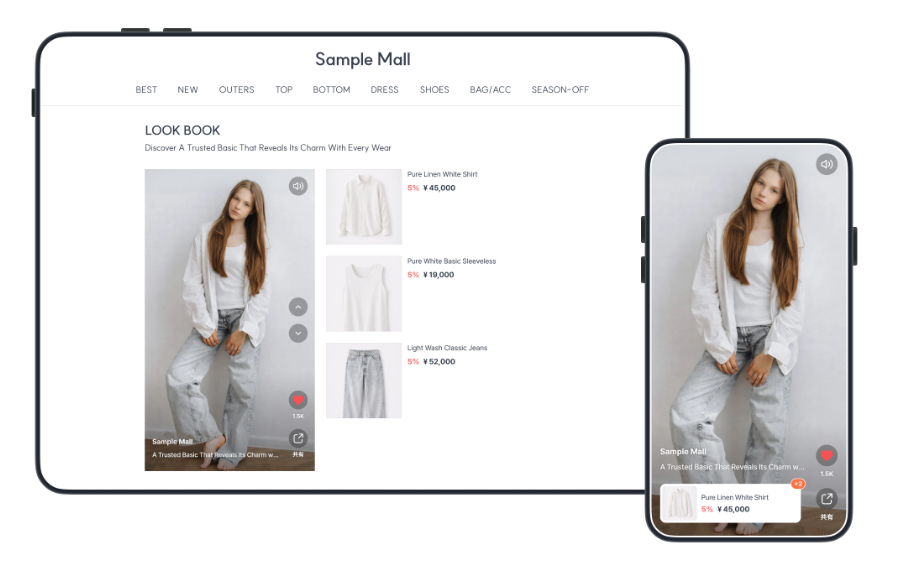
### **1.マルチショッププレイヤー（旧プレイリスト）**

動画と商品リストをセットで配置できるスタイルです。\
着用感などを**動画で確認しながら、気になった商品をすぐにチェックできる**ため、コーディネート紹介などにおすすめ。

<div align="center"><figure><img src="/files/eZtngTtXxUsqYNzhwOg8" alt="" width="563"><figcaption><p>画像クリックで拡大表示</p></figcaption></figure></div>

商品リストの表示方法は3つのレイアウトから選択可能です。

<div align="center"><figure><img src="/files/IUSdl9X2g4OHZyokppS2" alt="" width="279"><figcaption></figcaption></figure></div>

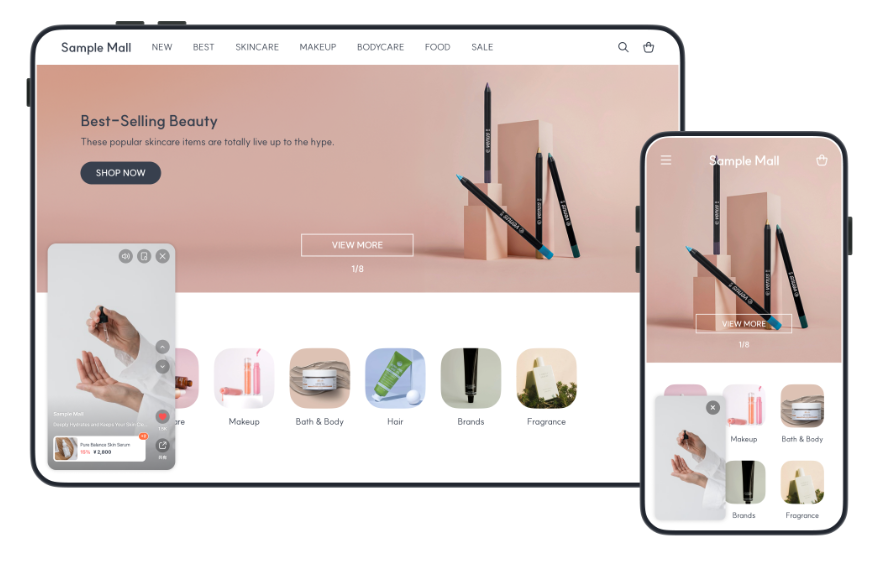
### **2.フローティングウィジェット（ミニプレイヤー）**

画面の右下や左下などに、**常に小さな動画を表示させておくウィジェット**です。\
ページを下にスクロールしても動画が追いかけてくるため、お客様のお買い物の邪魔をせずに、\
商品のディティールやおすすめの使い方などを自然にアピールし続けることができます。

<div align="center"><figure><img src="/files/2kf8ZIKlqf1zmHrR18Jk" alt="" width="563"><figcaption><p>画像クリックで拡大表示</p></figcaption></figure></div>

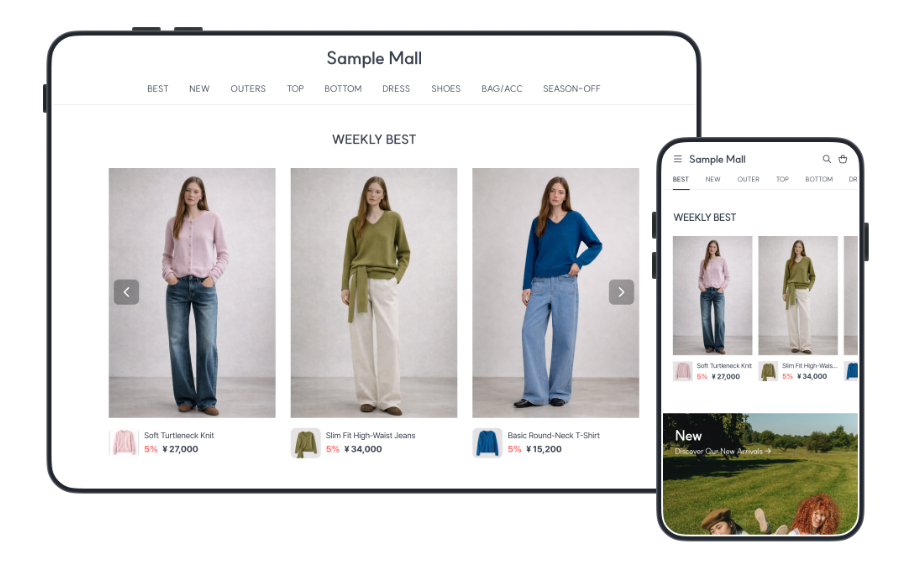
### **3.スライドウィジェット（横スワイプパーツ）**

**ウィンドウショッピング感覚で、次々と商品をチェック**。\
左右にスワイプして複数の動画をザッピング（拾い見）できるスタイルです。\
カタログをパラパラめくるような感覚で、お客様にたくさんの商品を楽しく発見してもらうのにぴったりです。

<div align="center"><figure><img src="/files/nFwDqvEAlwkFUmPt98An" alt="" width="563"><figcaption><p>画像クリックで拡大表示</p></figcaption></figure></div>

### 【重要】旧「プレイリスト」をご利用中のお客様へ

今回のアップデートに伴い、従来の「プレイリスト」は、新しい「マルチショッププレイヤー」として\
ウィジェット機能の中に統合されました。\
スワイプの反応速度が約3倍になり、より快適にご視聴いただけます。

#### 既存のプレイリストタグの取り扱いについて

* **既存タグはそのまま利用・表示できます**\
  現在サイトに埋め込まれている旧プレイリストタグは、そのまま継続してご利用いただけます。
* **データの編集は「ウィジェット」メニューから**\
  動画の順番変更などを行う場合は、新しく追加された「ウィジェット」メニューから作業してください。（※既存のプレイリストデータは、自動でウィジェット側へ複製されています）
* **タグを貼り替えずに編集内容を反映できます**\
  ウィジェットメニューで内容を修正した場合、利用している旧プレイリストタグを貼り替えなくても修正内容が自動で反映されます。基本的には差し替え作業なしでご利用いただけます。
* **新機能を利用したい場合は「新タグ」へ差し替えを**\
  「ランダム再生」など、今回新しく追加された機能を利用したい場合にのみ、新しく発行される「ウィジェット用タグ」への差し替えが必要となります。

***

## **商品管理もスマートにアップデート！**

動画ごとに同じ商品情報を入力する手間がなくなりました。\
一度登録した商品情報は、リストから検索して、別の動画にも簡単に設定（紐づけ）できるようになりました。

<figure><img src="/files/1MuQedmmpWQmekk7XtbQ" alt="" width="563"><figcaption><p>画像クリックで拡大</p></figcaption></figure>


---

# Agent Instructions
This documentation is published with GitBook. GitBook is the documentation platform designed so that both humans and AI agents can read, navigate, and reason over technical content effectively. Learn more at gitbook.com.

## Querying This Documentation
If you need additional information that is not directly available in this page, you can query the documentation dynamically by asking a question.

Perform an HTTP GET request on the current page URL with the `ask` query parameter, and the optional `goal` query parameter:

```
GET https://support.charlla.io/jp/users-guide/widget.md?ask=<question>&goal=<endgoal>
```

`ask` is the immediate question: it should be specific, self-contained, and written in natural language.
`goal` is optional and describes the broader end goal you are ultimately trying to accomplish on behalf of the user. GitBook uses it to tailor the answer towards what is most useful for that goal.

The response will contain a direct answer to the question and relevant excerpts and sources from the documentation.

Use this mechanism when the answer is not explicitly present in the current page, you need clarification or additional context, or you want to retrieve related documentation sections.